A Five-Minute Read of a Developing Story
A five-minute read of a developing story gives you a dated record to compare with later updates, so you can spot what changed and what remains open.
What can you take from a developing story now, and what should wait for a later update? A five-minute read of a developing story can give you a dated record of how the coverage is changing, rather than a verdict on events that are still unfolding.
That distinction matters when a live page is growing, an early account is being revised or several outlets are repeating the same announcement. Make a short note of the report’s version and its changes. The aim is to compare how the story develops, not to turn an early impression into a firm conclusion.
Record the version you actually read
Write down the outlet, headline and time you opened the report. Check whether the page has a publication time, an update note or both. A social-media preview may preserve an older headline after the article has changed, so keep the page itself as your reference.
Read the article rather than relying on a push alert or cropped screenshot. Note whether it is a live blog, a short bulletin or a longer report: each gives you a different view of the story’s development. A live blog can make the sequence of updates visible; a brief bulletin may offer less detail about when individual claims appeared.
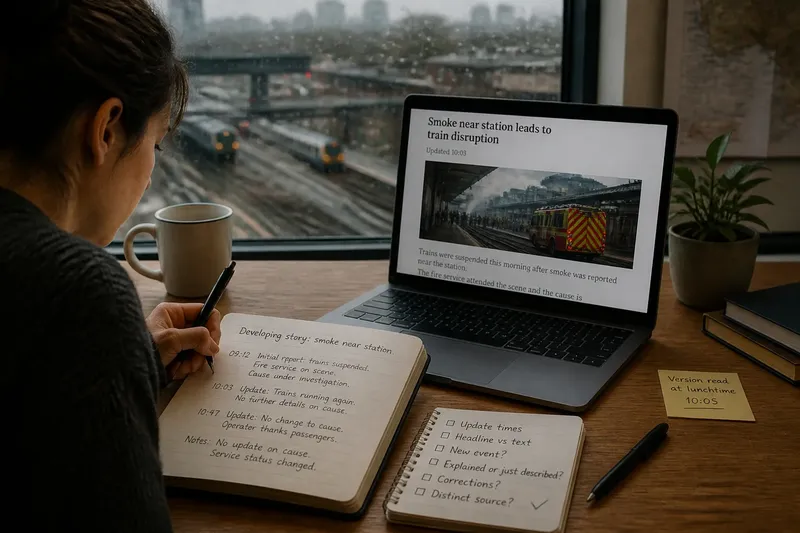
Give your note a simple label such as “version read at lunchtime”. That label makes the record useful later, even if you do not remember the exact wording of the headline.
Build a timeline of what the coverage says
Instead of trying to settle every claim on the first read, record the order in which the report presents developments. Use a few dated or timed lines, and attach each one to the article’s wording or update note. Keep a separate line for corrections or explicit changes.
For example, note “initial report: service suspended”, then “later update: cause described as under investigation”. This does not tell you what caused the disruption. It shows that the coverage has added a status update without resolving the cause.
Say you open a report about smoke near a railway station. Your starting note says that the operator has suspended trains and that the fire service is examining the cause. When you return, the page says trains are running again but gives no new account of the smoke. Add that change to the timeline; the observable result is that the service status has changed, while the cause remains unaddressed.
Compare updates by what changed?
Did the wording become more precise?
Compare the new phrasing with your dated note. If a broad description has been narrowed, record the new wording and keep the earlier version visible so the shift is clear.
Did the report add a new event or a new explanation?
Separate an update about what happened next from an explanation of why it happened. A page can describe a changed situation without adding an account of its cause.
Did the article correct or withdraw an earlier detail?
Look for an editor’s note, a changed passage or an explicit correction. Record what was changed, rather than silently replacing the earlier line in your own notes.
Does the update affect the question you are following?
Choose the particular question that matters to you, such as whether a service has resumed or whether the article has clarified a location. If the update does not address it, mark it unchanged rather than inferring an answer from a new headline.
Use a small comparison checklist
- Check the publication and update times; if the page has a newer update, add its time to your timeline, and if it has none, keep the earlier version as your latest reference.
- Check the headline against the article text; if the headline is broader than the body, record the narrower body wording, and if they match, note that the framing has not shifted.
- Check whether the update adds a new event; if it does, add that event as a separate timeline entry, and if it does not, leave the event sequence unchanged.
- Check whether the report explains a change or only describes it; if it supplies an explanation, note where the article presents it, and if it does not, keep the cause open.
- Check for an editor’s note or correction; if one appears, preserve the earlier wording and record the correction, and if none appears, do not assume that a quiet edit has resolved a disputed detail.
- Check whether another outlet’s report is based on a distinct account; if it identifies a separate document or source, record that route, and if it repeats the same announcement, treat it as another publication of the same account rather than a separate development.
Return to the story with a reason
On a later visit, compare the page with your dated record instead of starting another unstructured scroll. Check the update notice, then look for changes in sequence, wording, status and corrections. Keep the earlier entry if it helps explain how the report evolved.
A second article may clarify the timeline, but repetition across outlets does not by itself make an update independent. Notice whether it adds a distinct document, account or event, or simply carries forward the same announcement. That difference helps you describe the coverage accurately without treating repetition as a new development.
If nothing has changed on the point you are following, write “no update on cause” or “location wording unchanged” and pause. A scheduled briefing, a correction notice or a newly reported event can give you a concrete reason to return.
Let your account change with the coverage
A dated note is useful because it can be revised. Avoid treating the first version as permanent, and avoid filling gaps with guesses about motives or events the report does not describe. When you discuss the story, make clear whether you are describing an earlier version, a later update or a point the coverage has left open.
A five-minute read of a developing story is most useful when it leaves a trace you can compare: the version you saw, the changes made since, and the parts that have not moved. Keep those distinctions together, and you can tell someone not only what the latest report says, but how the account reached that point.